

 摘要:
C++ 日志库 spdlog:高性能、易用的现代日志解决方案 概述 spdlog 是一个快速、功能丰富的 C++ 日志库,专为高性能应用设计。它提供了简洁的 API、出色的性能以及...
摘要:
C++ 日志库 spdlog:高性能、易用的现代日志解决方案 概述 spdlog 是一个快速、功能丰富的 C++ 日志库,专为高性能应用设计。它提供了简洁的 API、出色的性能以及... 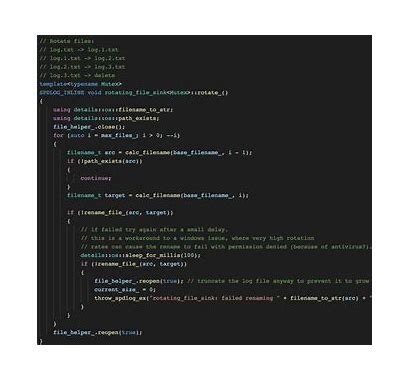
C++ 日志库 spdlog:高性能、易用的现代日志解决方案
概述
spdlog 是一个快速、功能丰富的 C++ 日志库,专为高性能应用设计。它提供了简洁的 API、出色的性能以及灵活的配置选项,已经成为 C++ 社区中最受欢迎的日志库之一。
核心特性
1. 卓越的性能
- 异步日志记录,几乎零开销
- 编译时格式化字符串解析
- 多线程安全
2. 丰富的功能
- 支持多种日志级别(trace, debug, info, warn, error, critical)
- 多种输出目标(控制台、文件、系统日志等)
- 日志轮转和自动清理
- 自定义格式化器
3. 简洁的 API
- 直观易用的接口
- 头文件库,无需编译安装
- 支持 C++11 及以上标准
安装与使用
安装方式
text
# 使用 vcpkg
vcpkg install spdlog

# 使用 conan
conan install spdlog/1.11.0

# 直接包含头文件(推荐)
# 只需将 include/spdlog 目录添加到包含路径
基本使用示例
text
#include <spdlog/spdlog.h>
#include <spdlog/sinks/basic_file_sink.h>
#include <spdlog/sinks/stdout_color_sinks.h>

int main() {
    // 1. 基础使用 - 控制台日志
    spdlog::info("欢迎使用 spdlog!");
    spdlog::warn("这是一条警告信息");
    spdlog::error("发生错误: {}", "文件未找到");

    // 2. 设置日志级别
    spdlog::set_level(spdlog::level::debug);
    spdlog::debug("调试信息 - 仅当级别为 debug 时显示");

    // 3. 创建自定义日志器
    auto console_logger = spdlog::stdout_color_mt("console");
    console_logger->info("来自自定义日志器的消息");

    // 4. 文件日志
    auto file_logger = spdlog::basic_logger_mt("file_logger", "logs/app.log");
    file_logger->info("这条消息会写入文件");

    // 5. 格式化示例
    int value = 42;
    double pi = 3.14159;
    std::string name = "spdlog";

    spdlog::info("格式化示例: 值={}, π={:.2f}, 名称={}", value, pi, name);

    return 0;
}
高级功能示例
1. 异步日志记录
text
#include <spdlog/async.h>
#include <spdlog/sinks/rotating_file_sink.h>

void setup_async_logging() {
    // 创建异步日志器
    auto async_logger = spdlog::create_async<spdlog::sinks::rotating_file_sink_mt>(
        "async_logger",
        "logs/async.log",
        1048576 * 5,  // 5MB
        3             // 保留3个备份文件
    );

    // 设置异步队列大小
    spdlog::init_thread_pool(8192, 1);

    async_logger->info("异步日志消息");
}
2. 多接收器日志器
text
#include <spdlog/sinks/stdout_color_sinks.h>
#include <spdlog/sinks/daily_file_sink.h>

void setup_multi_sink_logger() {
    auto console_sink = std::make_shared<spdlog::sinks::stdout_color_sink_mt>();
    auto file_sink = std::make_shared<spdlog::sinks::daily_file_sink_mt>(
        "logs/daily.log", 23, 59  // 每天23:59轮转
    );

    std::vector<spdlog::sink_ptr> sinks{console_sink, file_sink};
    auto multi_sink_logger = std::make_shared<spdlog::logger>("multi_sink",
                                                             sinks.begin(),
                                                             sinks.end());

    // 为不同接收器设置不同级别
    console_sink->set_level(spdlog::level::info);
    file_sink->set_level(spdlog::level::debug);

    spdlog::register_logger(multi_sink_logger);
    multi_sink_logger->info("这条消息会输出到控制台和文件");
    multi_sink_logger->debug("这条消息只会写入文件");
}
3. 自定义格式化
text
void custom_format_example() {
    auto logger = spdlog::stdout_color_mt("custom_format");

    // 设置自定义格式
    logger->set_pattern("[%Y-%m-%d %H:%M:%S.%e] [%^%l%$] [%n] %v");

    // 或者使用更详细的格式
    logger->set_pattern("[%Y-%m-%d %H:%M:%S.%e] [%^%l%$] [thread %t] [%s:%#] %v");

    logger->info("自定义格式的消息");
}
4. 条件日志记录
text
#include <spdlog/fmt/ostr.h>  // 支持输出自定义类型

struct Point {
    int x, y;

    // 为自定义类型重载 << 运算符
    friend std::ostream& operator<<(std::ostream& os, const Point& p) {
        return os << "(" << p.x << ", " << p.y << ")";
    }
};

void conditional_logging() {
    auto logger = spdlog::stdout_color_mt("conditional");

    // 条件日志
    int error_code = 0;
    SPDLOG_LOGGER_CONDITION(logger, spdlog::level::err,
                           error_code != 0,
                           "错误代码: {}", error_code);

    // 自定义类型输出
    Point p{10, 20};
    logger->info("点坐标: {}", p);
}
性能优化建议
1. 使用编译时格式化检查
text
// 使用 SPDLOG_STRING 宏进行编译时检查
SPDLOG_LOGGER_INFO(logger, SPDLOG_STRING("用户 {} 登录成功"), username);

// 或者使用 fmt 库的编译时检查
logger->info(FMT_STRING("处理了 {} 条记录"), record_count);
2. 合理配置异步日志
text
// 根据应用需求调整线程池大小
spdlog::init_thread_pool(10000, 2);  // 队列大小10000,2个工作线程

// 对于高频日志,考虑批量处理
for (int i = 0; i < 1000; ++i) {
    logger->info("消息 {}", i);
}
实际应用场景
1. 服务器应用日志
text
class Server {
private:
    std::shared_ptr<spdlog::logger> logger_;

public:
    Server() {
        logger_ = spdlog::rotating_logger_mt("server",
                                            "logs/server.log",
                                            1048576 * 10,  // 10MB
                                            5);            // 5个备份

        logger_->set_pattern("[%Y-%m-%d %H:%M:%S.%e] [%^%l%$] [%t] %v");
        logger_->flush_on(spdlog::level::warn);  // 警告及以上级别立即刷新
    }

    void handle_request(const Request& req) {
        logger_->info("收到请求: ID={}, 类型={}", req.id, req.type);

        try {
            process_request(req);
            logger_->info("请求处理成功: ID={}", req.id);
        } catch (const std::exception& e) {
            logger_->error("请求处理失败: ID={}, 错误: {}", req.id, e.what());
        }
    }
};
2. 性能监控
text
#include <chrono>

class PerformanceMonitor {
private:
    std::shared_ptr<spdlog::logger> perf_logger_;

public:
    PerformanceMonitor() {
        perf_logger_ = spdlog::daily_logger_mt("performance",
                                              "logs/perf.log",
                                              0, 0);  // 午夜轮转
        perf_logger_->set_pattern("%Y-%m-%d %H:%M:%S.%f | %v");
    }

    template<typename Func>
    auto measure(const std::string& operation, Func&& func) {
        auto start = std::chrono::high_resolution_clock::now();
        auto result = std::forward<Func>(func)();
        auto end = std::chrono::high_resolution_clock::now();

        auto duration = std::chrono::duration_cast<std::chrono::microseconds>
                       (end - start).count();

        perf_logger_->info("操作: {}, 耗时: {}μs", operation, duration);

        return result;
    }
};
最佳实践
- 合理选择日志级别:避免在生产环境中使用 trace/debug 级别
- 异步日志用于高性能场景:减少 I/O 阻塞对应用性能的影响
- 定期轮转日志文件:防止日志文件过大
- 统一日志格式:便于日志分析和监控
- 敏感信息过滤:避免在日志中记录密码等敏感信息
总结
spdlog 凭借其出色的性能、简洁的 API 和丰富的功能,已经成为 C++ 开发者的首选日志库。无论是简单的控制台应用还是复杂的高性能服务器,spdlog 都能提供合适的日志解决方案。通过合理的配置和使用,spdlog 可以帮助开发者更好地监控、调试和维护应用程序。
参考资料
spdlog_20260205092756.zip
类型:压缩文件|已下载:0|下载方式:免费下载
立即下载




还没有评论,来说两句吧...